
Choose the Right Role for Someone
- Who can do this
- HR Managers, Company Admins
- Plan
- The six roles are on every plan. Custom roles that add extra permissions need a plan that includes Roles and Permissions.
- Updated
Before You Start
- Each person has one role in your company. A person who works for two companies can have a different role in each.
Steps
- Step 1: Open the person's form: Add Employee for a new person, or Edit Employee on their profile.
- Step 2: Open the Role list. It shows only the roles you are allowed to give.
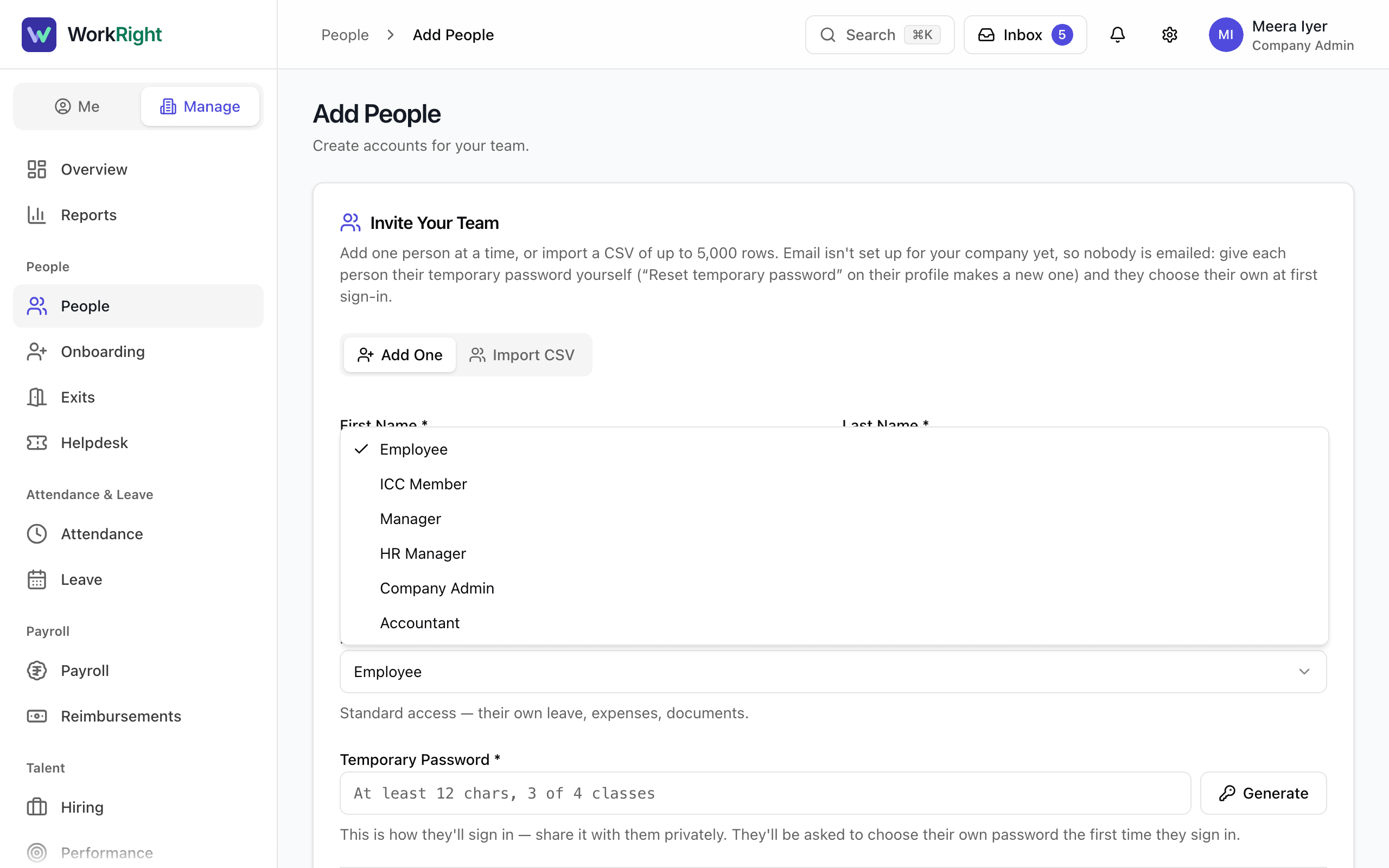
- Step 3: Pick Employee for standard access: their own leave, expenses, documents and pay.
- Step 4: Pick Manager for someone who approves leave and expenses for their direct reports. Managers see their team and its attendance, leave and hiring, but they cannot add people.
- Step 5: Pick HR Manager for full HR access: people, payroll, leave, exits, compliance and the books. This role must set up two-factor sign-in, and the app will not let them skip it.
- Step 6: Pick Company Admin for full company administration. A company admin can do everything an HR manager can, and can also make other company admins, change a company admin's access and set the company's two-factor policy.
- Step 7: Pick Accountant for someone who keeps the books. They get the accounting area and no people management.
- Step 8: Pick ICC Member for someone who sits on the POSH Internal Committee and handles complaints. Their Manage side shows POSH only.
- Step 9: Save the form. Select Add Employee for a new person or Save Changes for an existing one.
What Happens Next
- The person's menus and what they can open follow their role.
- The company owner is the person who created the company. Their role cannot be changed or switched off by anyone, including themselves, until ownership is moved. The owner can do that from Settings, under Company Details, on the Ownership card with Transfer Ownership.
- If your plan includes Roles and Permissions, you can create custom roles. They add permissions to the six roles above. They do not replace them.
If the App Says No
The app says:
only a company admin can make someone a company admin
What it means: You are an HR manager, and giving someone the Company Admin role is limited to company admins.
What to do: Ask a company admin to make the change.
The app says:
only a company admin can change a company admin's role or access
What it means: Changing or switching off a company admin is limited to company admins, so an HR manager cannot do it.
What to do: Ask a company admin.
The app says:
you cannot change your own role — ask another admin
What it means: Nobody can change their own role, so no one can promote themselves.
What to do: Ask another company admin or HR manager.
The app says:
The owner's role can't be changed. Transfer ownership first.
What it means: The company owner is protected from being demoted.
What to do: The owner moves ownership to another company admin first, then the role can change.
The app says:
this would leave the company without a company admin who is staying
What it means: Your company must always keep at least one company admin who is not leaving.
What to do: Make someone else a company admin first, then try again.
Questions People Ask
Why can't I make someone a company admin?
Only a company admin can give that role. This stops anyone from promoting themselves or a friend to the top. Ask a company admin to do it.
Does an HR manager need two-factor sign-in?
Yes. At their first sign-in the app takes them to a page that asks for a passkey or an authenticator app, and they cannot skip it. Other roles can turn it on from their profile, and a company admin can require it for everyone in Settings, under Security.
Can a manager add people?
No. A manager can see the people who report to them under My Team, but only company admins and HR managers can add or edit people.
Who is the company owner?
The person who created the company in WorkRight. The owner stays a company admin and cannot be demoted, deactivated or taken through an exit. They can hand ownership to another company admin at any time.
What is the ICC Member role for?
It is for people who sit on the POSH Internal Committee. Their Manage side shows POSH only, starting with the complaint register. The committee itself is set up in the POSH area, under Internal Committee.
Related
- Add an Employee — Add one person to your company, send them an invite to sign in, and start their onboarding checklist.
- Change Someone's Role or Job Details — Edit a person's role, manager, department, designation, pay and other details from their profile.
- Sign In for the First Time — Set your own password from the invite email, add two-factor sign-in if your role needs it, and answer the data consent box.
- Add Contract Staff, Interns and Consultants — How to add someone who is not a regular full-time employee, and how to pay them through payroll or by invoice.
Plain-English summary of how the app works, not legal advice.